
Solovant

Most people open ChatGPT, type a prompt, and expect great results right away. That was exactly how I started using it. At first, the responses were good, but they didn’t always sound like me. Sometimes they were too formal. Other times they were overly enthusiastic, too long, or written in a style that I would never use in a professional email, blog post, or course.
Everything changed when I started exploring ChatGPT’s personalization settings.
I realized that ChatGPT isn’t just about writing better prompts. It’s also about teaching the AI how you prefer to work, write, and communicate. Once I spent a few minutes configuring it, the responses became much more accurate, more consistent, and much closer to the tone I was looking for. If you’re using ChatGPT regularly, whether for work, school, business, or creative projects, taking a few minutes to customize your settings is one of the easiest ways to improve your experience.
Why Personalization Matters
- Think of ChatGPT as working with a new assistant.
- If you never explain your preferences, every conversation starts from scratch. The assistant doesn’t know whether you prefer short or detailed answers, formal or conversational writing, or whether you’re creating content for business, education, or marketing.
- Personalization gives ChatGPT that context from the beginning.
- Instead of repeating the same instructions in every conversation, you configure them once and let ChatGPT build on those preferences over time.
- The result is less editing, fewer follow-up prompts, and responses that feel much more natural.
Free vs. ChatGPT Plus
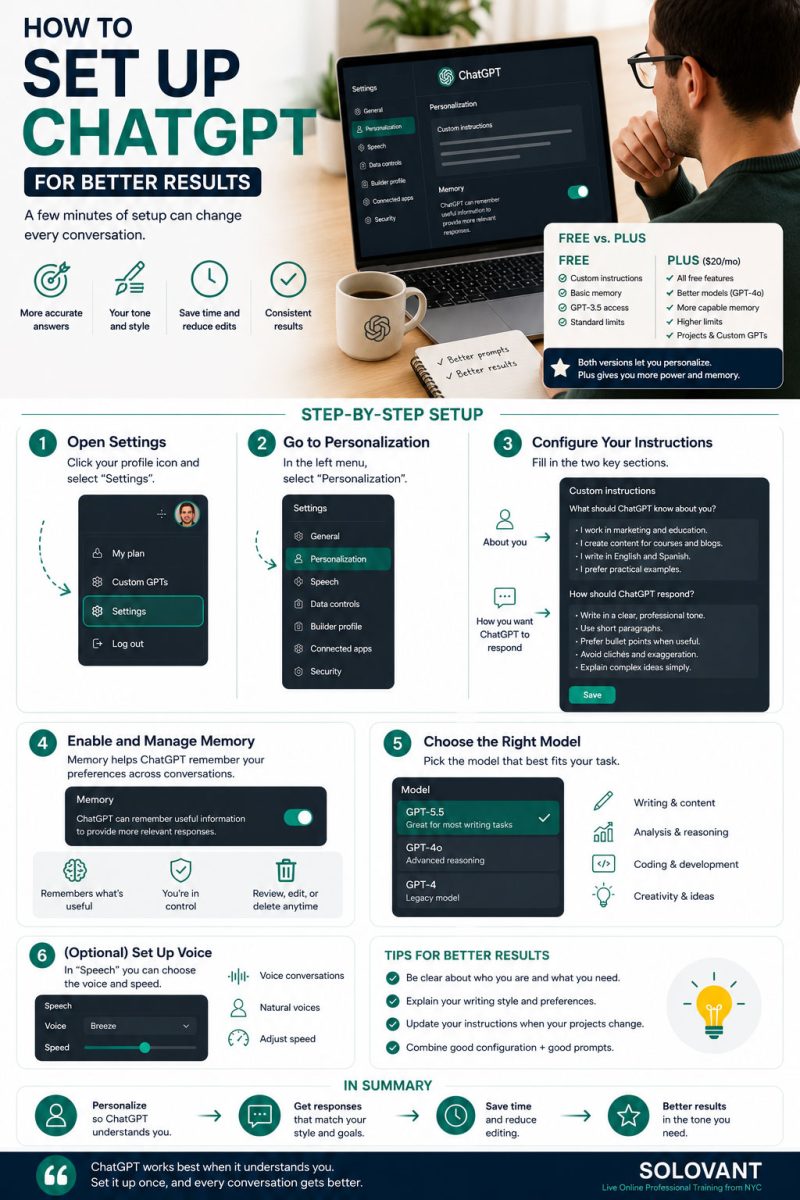
One question I hear often is whether personalization is only available with ChatGPT Plus. The answer is no. The free version already includes useful personalization features such as Custom Instructions and basic preferences. You can tell ChatGPT who you are and how you want it to respond.
However, ChatGPT Plus offers a more complete experience.
With the Plus subscription, you gain access to more advanced models, higher usage limits, improved memory capabilities, Projects, and Custom GPTs. If ChatGPT is part of your daily workflow, these features make the experience more powerful and consistent. For occasional users, the free version is a great place to start. For professionals who rely on AI every day, Plus can be a worthwhile investment.
The First Setting I Recommend
The first place I always recommend visiting is Settings > Personalization.
This section allows you to tell ChatGPT about yourself and, more importantly, how you want it to respond.
For example, you can specify that you prefer:
- Clear, professional writing
- Short paragraphs
- Practical examples
- Active voice
- Minimal marketing language
- Bullet points only when helpful
- Responses in English, Spanish, or both
These may seem like small preferences, but together they completely change the quality of the responses.
Memory Makes Conversations Better
Another feature that many people overlook is Memory.
When enabled, ChatGPT can remember useful information about your preferences across conversations. It might remember your preferred writing style, your profession, the software you use most often, or ongoing projects. That doesn’t mean it remembers everything forever. You remain in control and can review, edit, or delete saved memories whenever you want. The important point is that you spend less time repeating yourself and more time getting useful work done.
Your Prompts Still Matter
- Customizing ChatGPT doesn’t replace good prompting.
- Think of personalization as setting the stage, while prompts provide the specific direction for each conversation.
- The best results come from combining both.
- A well-configured ChatGPT paired with a clear prompt consistently produces better output than either one alone.
Final Thoughts
One of the biggest misconceptions about ChatGPT is that better results come only from learning advanced prompts. In my experience, that’s only part of the equation. Once I customized my settings, the responses became noticeably more aligned with the way I think, write, and communicate. I spent less time rewriting text and more time refining ideas. If you’ve never opened the Personalization settings, take five minutes and do it today. It’s one of the simplest improvements you can make, and one that you’ll notice in every conversation afterward.